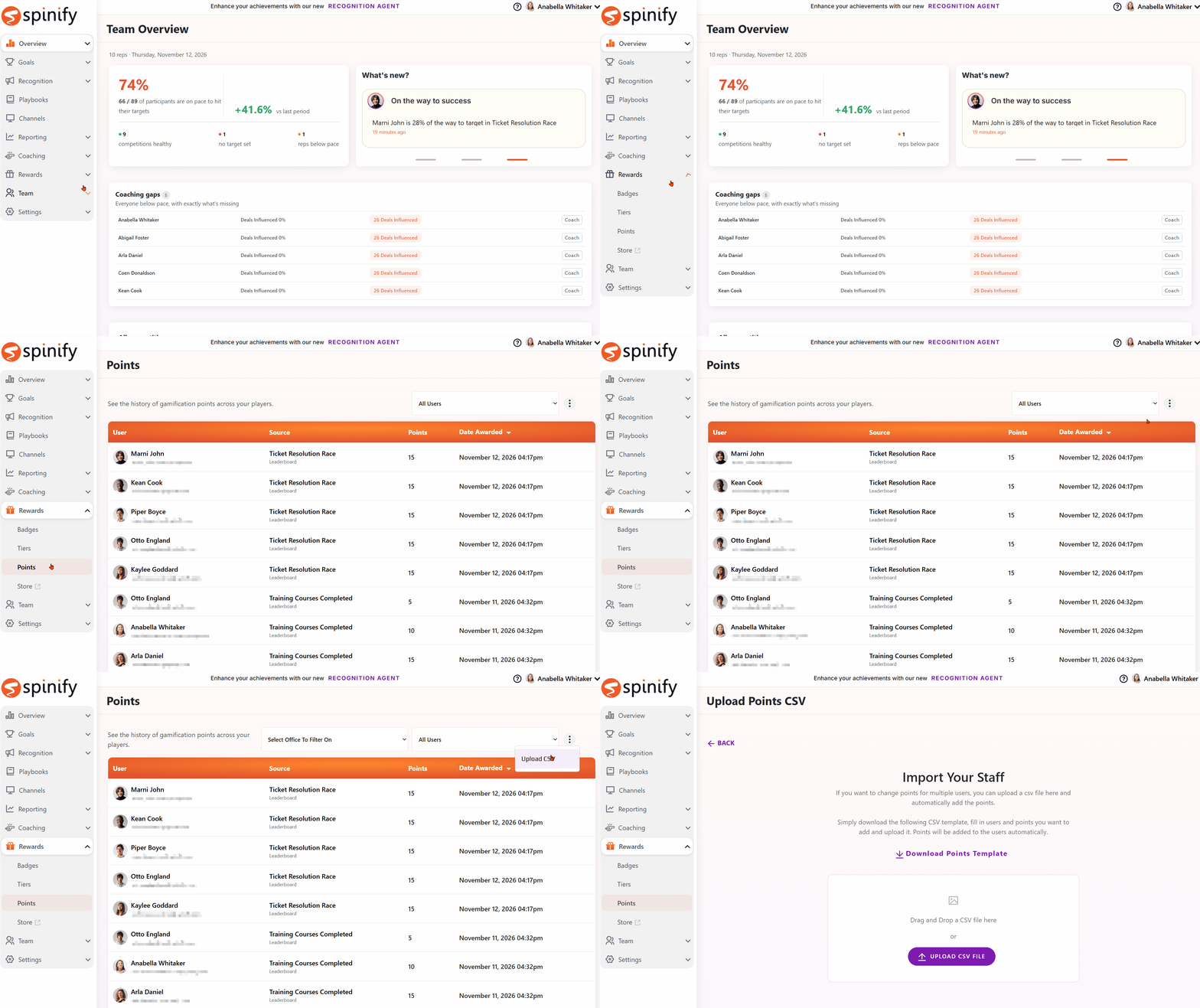
Spinify allows you to adjust gamification points in bulk using a CSV file. This makes it easier to update multiple users' points without having to adjust each user's balance individually.
How to Upload Gamification Points via CSV
- Navigate to Rewards.
- Select Points.
- Locate the CSV Upload option.
- Prepare your CSV file using the required format.
- Upload your CSV file to adjust the gamification points.
- Review the updated points to ensure the changes have been applied correctly.
When Would You Use This Feature?
Bulk point adjustments are useful when you need to:
- Award bonus points: Recognize employees for achievements or activities outside your regular competitions.
- Make bulk adjustments: Update multiple users' gamification points at once.
- Correct point balances: Make adjustments when points need to be corrected.
- Manage manual rewards: Allocate points for special incentives, team initiatives, or one-off recognition programs.
Important Information
- Ensure your CSV file follows the required upload format.
- Double-check user details and point values before uploading.
- Review point balances after uploading to confirm the adjustments were successful.