---
title: Can I Add My Recognition Agent To Slack?
description: Add your Spinify Recognition Agents directly into your Slack Channels to ensure you NEVER miss an update!
---
[Skip to content](https://knowledge.spinify.com/help/can-i-add-my-recognition-agent-to-slack#main-content)
English
Show submenu for translations
[Create Ticket](https://knowledge.spinify.com/help/kb-tickets/new?hsLang=en) [Customer Portal](https://knowledge.spinify.com/tickets?hsLang=en)
- [Home](https://knowledge.spinify.com/)
- [Customer Portal](https://knowledge.spinify.com/tickets?offset=0)
- [Academy](https://academy.spinify.com/trainings)
- [YouTube](https://www.youtube.com/channel/UCr89cR8jfrU7LbTBFSu2iPQ)
- [Success Stories](https://spinify.com/customer-stories/)
- [Blog](https://spinify.com/blog/)
Open main navigation
Close main navigation
- [Home](https://knowledge.spinify.com/)
- [Customer Portal](https://knowledge.spinify.com/tickets?offset=0)
- [Academy](https://academy.spinify.com/trainings)
- [YouTube](https://www.youtube.com/channel/UCr89cR8jfrU7LbTBFSu2iPQ)
- [Success Stories](https://spinify.com/customer-stories/)
- [Blog](https://spinify.com/blog/)
- English
Show submenu for translations
- [Create Ticket](https://knowledge.spinify.com/help/kb-tickets/new)
- [Customer Portal](https://knowledge.spinify.com/tickets)
- [Spinify Academy](https://academy.spinify.com/trainings)
[Spinify Academy](https://academy.spinify.com/trainings)
How can we help you?
- There are no suggestions because the search field is empty.
1. [Spinify Knowledge](https://knowledge.spinify.com/help?hsLang=en)
2. [FAQs](https://knowledge.spinify.com/help/faqs?hsLang=en)
3. [Achievement](https://knowledge.spinify.com/help/faqs?hsLang=en#achievement)
# Can I Add My Recognition Agent To Slack?
### Recognition Agent in Slack – FAQ & Setup Guide
#### What does the Recognition Agent do in Slack?
The Recognition Agent automatically posts competition updates, highlights, and achievement celebrations directly into your selected Slack channels—keeping your team engaged in real time.
### How do I add the Recognition Agent to Slack?
Follow these steps:
1. **Ensure Slack integration is enabled**
- Confirm your workspace has [Slack connected to Spinify](https://knowledge.spinify.com/help/how-to-integrate-spinify-with-slack?hsLang=en)
2. **Go to Recognition**
- Navigate to **Recognition → Announcements**
3. **Manage your Agent**
- Click **Manage Achievements**
4. **Create or edit an Agent**
- Edit an existing agent using the ✏️ icon
- Or create a new Recognition Agent
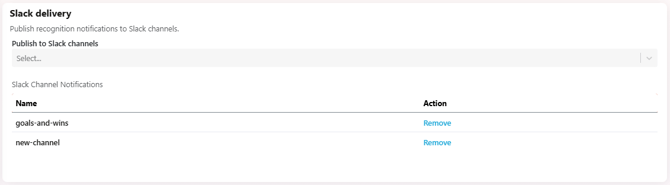
5. **Configure Slack posting**
- During setup, select the **Slack channel(s)** where updates should be posted
6. **Save your Agent**
- Click **Save** or **Create**
### What happens after setup?
Once configured, your Recognition Agent will automatically post:
- Competition updates
- Motivation towards Goals
- Highlight summaries
All directly into your selected Slack channels, no manual work required.
### Troubleshooting
**Not seeing posts in Slack?**
- Make sure Slack integration is enabled
- Confirm the correct channel is selected
- [Check permissions for the Spinify Slack app](https://knowledge.spinify.com/help/troubleshooting-slack-notifications?hsLang=en)
- [Discover Spinify](https://knowledge.spinify.com/help/discover-spinify?hsLang=en)
- [Quick Set Up](https://knowledge.spinify.com/help/quick-set-up?hsLang=en#main-content)
- [Competitions & Leaderboards](https://knowledge.spinify.com/help/quick-set-up?hsLang=en#competitions-leaderboards)
- [Users](https://knowledge.spinify.com/help/quick-set-up?hsLang=en#users)
- [Achievements](https://knowledge.spinify.com/help/quick-set-up?hsLang=en#achievements)
- [TV & Displays](https://knowledge.spinify.com/help/quick-set-up?hsLang=en#tv-displays)
- [Onboarding](https://knowledge.spinify.com/help/quick-set-up?hsLang=en#onboarding)
- [Single Sign On](https://knowledge.spinify.com/help/quick-set-up?hsLang=en#single-sign-on)
- [Integrations](https://knowledge.spinify.com/help/integrations?hsLang=en#main-content)
- [Agentbox](https://knowledge.spinify.com/help/integrations?hsLang=en#agentbox)
- [MRI Box and Dice](https://knowledge.spinify.com/help/integrations?hsLang=en#mri-box-and-dice)
- [Bullhorn](https://knowledge.spinify.com/help/integrations?hsLang=en#bullhorn)
- [Zendesk](https://knowledge.spinify.com/help/integrations?hsLang=en#zendesk)
- [PowerBI](https://knowledge.spinify.com/help/integrations?hsLang=en#powerbi)
- [CSV Upload](https://knowledge.spinify.com/help/integrations?hsLang=en#csv-upload)
- [HubSpot](https://knowledge.spinify.com/help/integrations?hsLang=en#hubspot)
- [Google Sheets](https://knowledge.spinify.com/help/integrations?hsLang=en#google-sheets)
- [Google Slides or Google Calendar](https://knowledge.spinify.com/help/integrations?hsLang=en#google-slides-or-google-calendar)
- [Spinify API](https://knowledge.spinify.com/help/integrations?hsLang=en#spinify-api)
- [Salesforce Reports](https://knowledge.spinify.com/help/integrations?hsLang=en#salesforce-reports)
- [Microsoft Excel](https://knowledge.spinify.com/help/integrations?hsLang=en#microsoft-excel)
- [Pipedrive](https://knowledge.spinify.com/help/integrations?hsLang=en#pipedrive)
- [Salesforce Trailhead](https://knowledge.spinify.com/help/integrations?hsLang=en#salesforce-trailhead)
- [Tableau](https://knowledge.spinify.com/help/integrations?hsLang=en#tableau)
- [LockedOn](https://knowledge.spinify.com/help/integrations?hsLang=en#lockedon)
- [Microsoft Teams](https://knowledge.spinify.com/help/integrations?hsLang=en#microsoft-teams)
- [SQL](https://knowledge.spinify.com/help/integrations?hsLang=en#sql)
- [Slack](https://knowledge.spinify.com/help/integrations?hsLang=en#slack)
- [Microsoft Dynamics](https://knowledge.spinify.com/help/integrations?hsLang=en#microsoft-dynamics)
- [Outreach](https://knowledge.spinify.com/help/integrations?hsLang=en#outreach)
- [Rex Software](https://knowledge.spinify.com/help/integrations?hsLang=en#rex-software)
- [JobAdder](https://knowledge.spinify.com/help/integrations?hsLang=en#jobadder)
- [Salesforce](https://knowledge.spinify.com/help/integrations?hsLang=en#salesforce)
- [Follow Up Boss](https://knowledge.spinify.com/help/integrations?hsLang=en#follow-up-boss)
- [Zapier](https://knowledge.spinify.com/help/integrations?hsLang=en#zapier)
- [CloudCall](https://knowledge.spinify.com/help/integrations?hsLang=en#cloudcall)
- [Freshdesk](https://knowledge.spinify.com/help/integrations?hsLang=en#freshdesk)
- [MRI Vault CRM](https://knowledge.spinify.com/help/integrations?hsLang=en#mri-vault-crm)
- [Webhooks](https://knowledge.spinify.com/help/integrations?hsLang=en#webhooks)
- [FTP](https://knowledge.spinify.com/help/integrations?hsLang=en#ftp)
- [GetAccept](https://knowledge.spinify.com/help/integrations?hsLang=en#getaccept)
- [Close CRM](https://knowledge.spinify.com/help/integrations?hsLang=en#close-crm)
- [HighLevel](https://knowledge.spinify.com/help/integrations?hsLang=en#highlevel)
- [Aircall](https://knowledge.spinify.com/help/integrations?hsLang=en#aircall)
- [Kixie](https://knowledge.spinify.com/help/integrations?hsLang=en#kixie)
- [LeadDesk](https://knowledge.spinify.com/help/integrations?hsLang=en#leaddesk)
- [Zoho](https://knowledge.spinify.com/help/integrations?hsLang=en#zoho)
- [Incentives](https://knowledge.spinify.com/help/incentives?hsLang=en#main-content)
- [Reward Store](https://knowledge.spinify.com/help/incentives?hsLang=en#reward-store)
- [Points, Badges & Tiers](https://knowledge.spinify.com/help/incentives?hsLang=en#points-badges-tiers)
- [Prize Wheels](https://knowledge.spinify.com/help/incentives?hsLang=en#prize-wheels)
- [FAQs](https://knowledge.spinify.com/help/faqs?hsLang=en#main-content)
- [Competitions](https://knowledge.spinify.com/help/faqs?hsLang=en#competitions)
- [Account](https://knowledge.spinify.com/help/faqs?hsLang=en#account)
- [TV & Channels](https://knowledge.spinify.com/help/faqs?hsLang=en#tv-channels)
- [Spinify](https://knowledge.spinify.com/help/faqs?hsLang=en#spinify)
- [Troubleshooting](https://knowledge.spinify.com/help/faqs?hsLang=en#troubleshooting)
- [Sidekick](https://knowledge.spinify.com/help/faqs?hsLang=en#sidekick)
- [Achievement](https://knowledge.spinify.com/help/faqs?hsLang=en#achievement)
- [Manager Toolkit](https://knowledge.spinify.com/help/manager-toolkit?hsLang=en#main-content)
- [AI Coaching Agent](https://knowledge.spinify.com/help/manager-toolkit?hsLang=en#ai-coaching-agent)
- [Analytics](https://knowledge.spinify.com/help/manager-toolkit?hsLang=en#analytics)
- [Messages & Announcements](https://knowledge.spinify.com/help/manager-toolkit?hsLang=en#messages-announcements)
- [Coaching Tools](https://knowledge.spinify.com/help/manager-toolkit?hsLang=en#coaching-tools)
- [Administration & Accounts](https://knowledge.spinify.com/help/administration-accounts?hsLang=en#main-content)
- [Billing](https://knowledge.spinify.com/help/administration-accounts?hsLang=en#billing)
- [Privacy & Terms](https://knowledge.spinify.com/help/administration-accounts?hsLang=en#privacy-terms)
- [Players Zone](https://knowledge.spinify.com/help/players-zone?hsLang=en)
- [Apps & Extensions](https://knowledge.spinify.com/help/apps-extensions?hsLang=en#main-content)
- [Chrome Extension](https://knowledge.spinify.com/help/apps-extensions?hsLang=en#chrome-extension)
- [Mobile App](https://knowledge.spinify.com/help/apps-extensions?hsLang=en#mobile-app)
- [Spinify MCP](https://knowledge.spinify.com/help/apps-extensions?hsLang=en#spinify-mcp)
[.png?width=150&height=150&name=download%20(2).png "download (2)")](https://Spinify.com)
#1 Ranked Sales Gamification Software
[mailto:email@email.com](mailto:email@email.com)
Copyright © 2024, Spinify