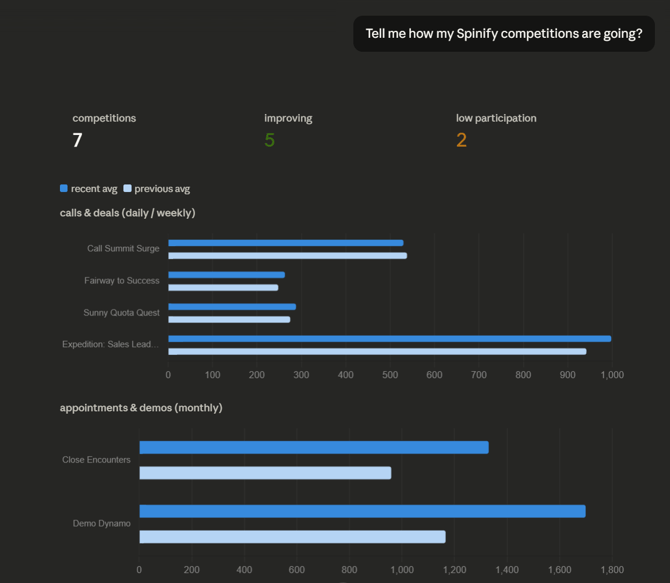
Model Context Protocol (MCP) allows Claude to interact directly with your Spinify data, providing real-time insights into your team's performance, leaderboards, and gamification metrics. Follow this guide to set up the connection.
Prerequisites
-
An active Claude AI account
-
Your Spinify login credentials.
Setup Instructions
1. Access Connector Settings
Log in to your Claude.ai account. Click on your User Profile/Name in the bottom-left corner to open the menu, then select Settings. From the sidebar, navigate to the Connectors tab.
2. Add the Spinify Connector
Click the Add Custom Connector button. You will be prompted to provide the following details:
-
Name: Spinify (or a name of your choice).
-
Remote MCP Server URL:
https://mcp.spinify.com/mcp
Click Add to save the configuration.
3. Authenticate with Spinify
Once added, locate the Spinify connector in your list and click Connect. A pop-up window will appear asking you to log in to your Spinify Account. Enter your credentials to authorize the link between the two platforms.
4. Configure Permissions
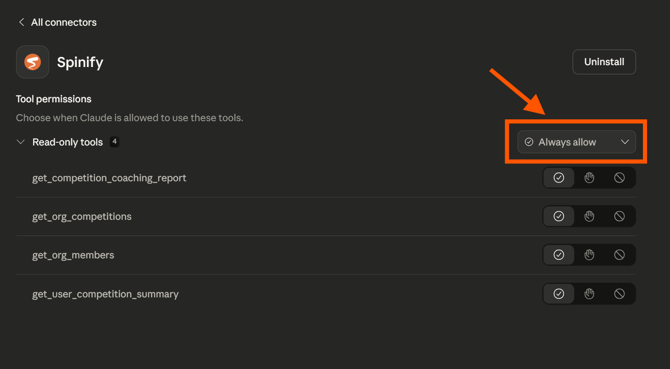
To ensure a seamless experience without constant prompts, go to the Configure settings for the Spinify connector. Set the Tool Permissions to "Always allow". This grants Claude permission to fetch your leaderboard data whenever you ask.
Using Spinify in Claude
Start a New Chat and ask Claude about your performance data. You can now use natural language to gain insights, such as:
-
"Who is currently leading the Sales leaderboard?"
-
"Summarize my team's progress toward our monthly targets."
-
"Identify my lowest performing team members"
- "Give me some advice on coaching John Smith"
- "Ring the Gong for [name]"
Claude will then get to work connecting with Spinify to gather insights, graphs, and advice to help you make the most of your Spinify experience, and get the best out of your team!