---
title: How to Create Countdowns
description: Drive anticipation with Spinify Countdowns! Learn to set up timely countdowns for events or deadlines, enhancing engagement and focus.
---
[Skip to content](https://knowledge.spinify.com/help/how-to-create-countdowns#main-content)
English
Show submenu for translations
[Create Ticket](https://knowledge.spinify.com/help/kb-tickets/new?hsLang=en) [Customer Portal](https://knowledge.spinify.com/tickets?hsLang=en)
- [Home](https://knowledge.spinify.com/)
- [Customer Portal](https://knowledge.spinify.com/tickets?offset=0)
- [Academy](https://academy.spinify.com/trainings)
- [YouTube](https://www.youtube.com/channel/UCr89cR8jfrU7LbTBFSu2iPQ)
- [Success Stories](https://spinify.com/customer-stories/)
- [Blog](https://spinify.com/blog/)
Open main navigation
Close main navigation
- [Home](https://knowledge.spinify.com/)
- [Customer Portal](https://knowledge.spinify.com/tickets?offset=0)
- [Academy](https://academy.spinify.com/trainings)
- [YouTube](https://www.youtube.com/channel/UCr89cR8jfrU7LbTBFSu2iPQ)
- [Success Stories](https://spinify.com/customer-stories/)
- [Blog](https://spinify.com/blog/)
- English
Show submenu for translations
- [Create Ticket](https://knowledge.spinify.com/help/kb-tickets/new)
- [Customer Portal](https://knowledge.spinify.com/tickets)
- [Spinify Academy](https://academy.spinify.com/trainings)
[Spinify Academy](https://academy.spinify.com/trainings)
How can we help you?
- There are no suggestions because the search field is empty.
1. [Spinify Knowledge](https://knowledge.spinify.com/help?hsLang=en)
2. [Manager Toolkit](https://knowledge.spinify.com/help/manager-toolkit?hsLang=en)
3. [Messages & Announcements](https://knowledge.spinify.com/help/manager-toolkit?hsLang=en#messages-announcements)
# How to Create Countdowns
What are Countdowns?
Countdowns are used by managers to let the team know something is coming up. It could be for a big event, deadline, or even just a quick meeting at the end of the day.
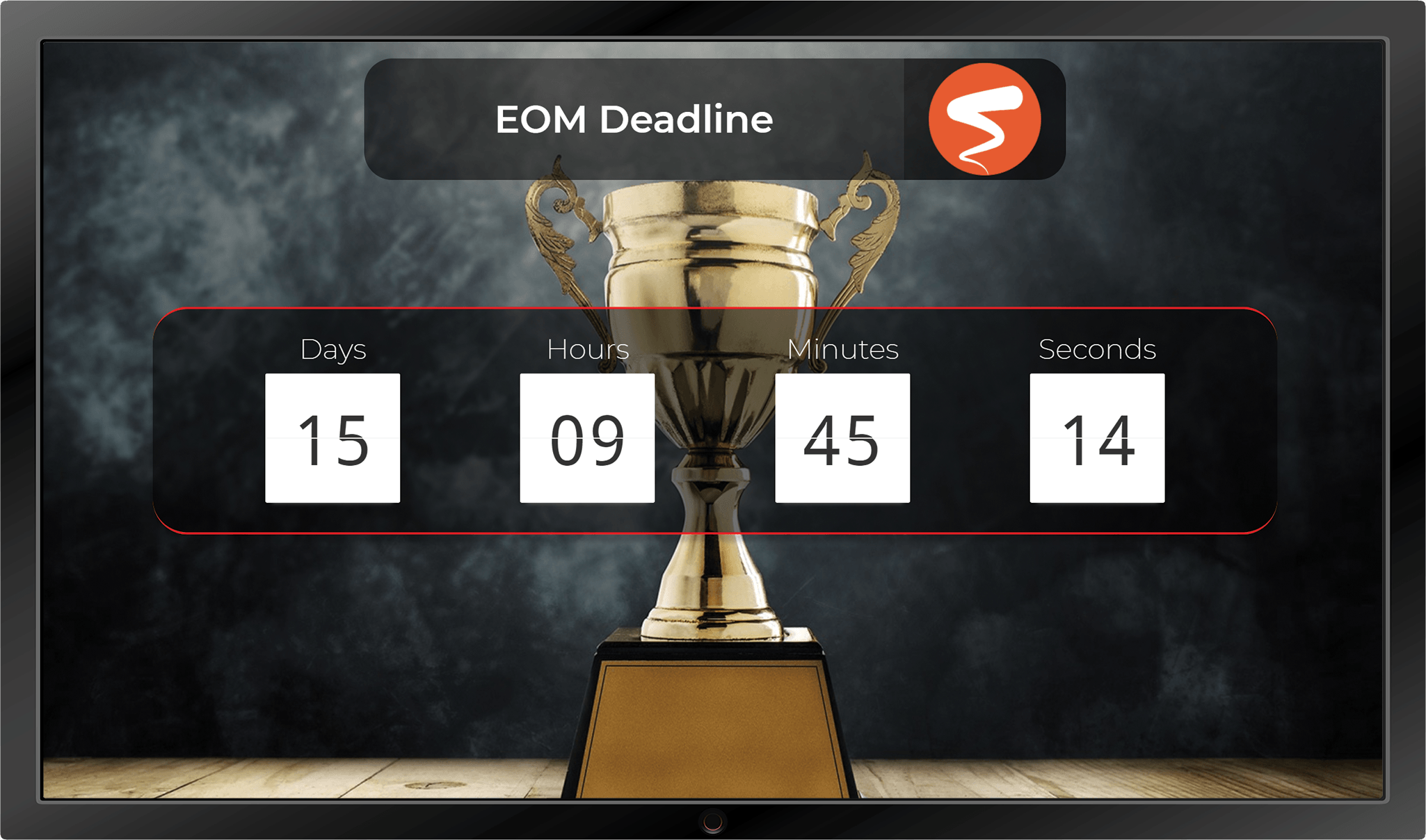
How to create a Countdown
- Log into your **[MySpinify](https://my.spinify.com/?hsLang=en)** account
- From the left-hand menu click "Announcements" then click the "Messages" tab
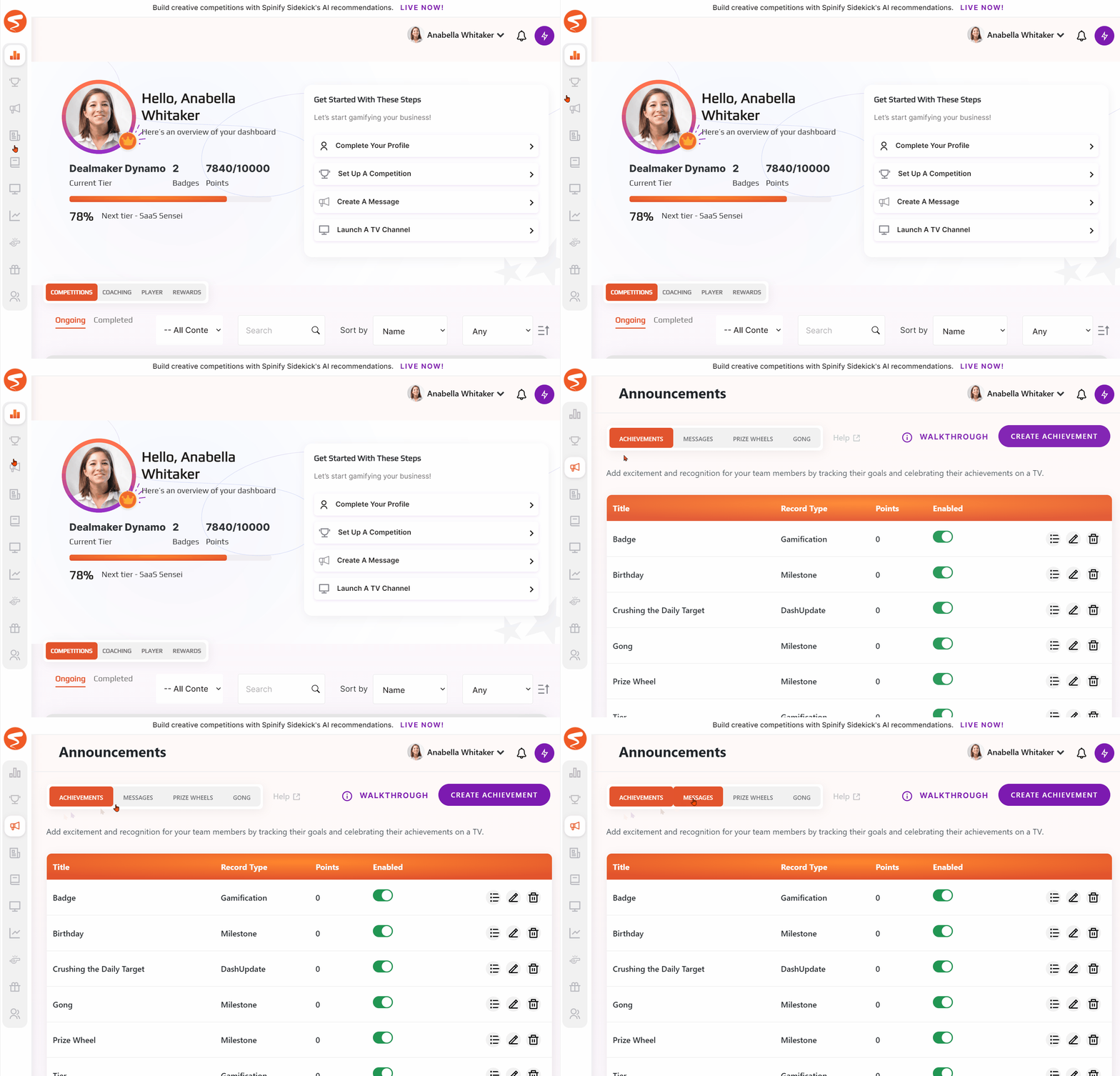
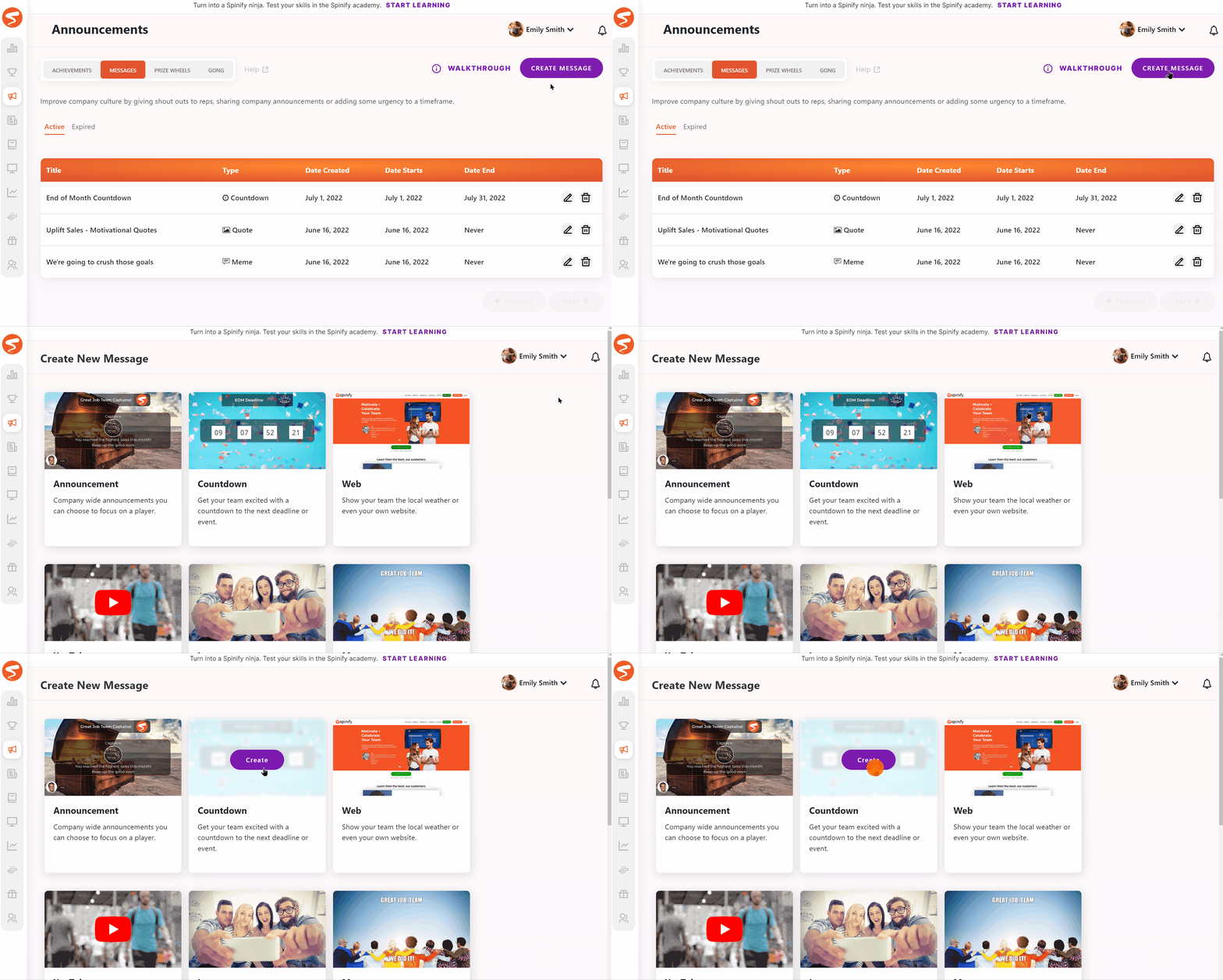
- Click the "**Create Message**" button at the top right of the page
- Hover over Countdown and click "**Create**"
### Countdown
- Enter a Title and Theme for your Countdown
- Choose the Recurrence and duration that your Countdown will run
### Background
- Next, you can select a background for your message. You can set either a video or an image and the style you want.
*Note: If you upload an image and want it to fit nicely your image should be a 16:9 ratio. So a resolution of 1920x1080 is optimal.*
### TV Duration
- Set the duration of your message (How long it will stay on the TV each time it is shown)
### Channels
If you have some channels set up you can choose them here and the message will automatically be added to those channels.
If you haven't set up your channel yet you can do so after you finish creating your message. *Check out [TV Channels](https://knowledge.spinify.com/360025626232?hsLang=en) for more info.*
#### ***🎓Want to learn more about optimizing your Messages? Register [here](https://academy.spinify.com/training/790a1bc2-af1a-11ec-b418-06cf503dca07/overview)to access Spinify Academy!🎓***
- [Discover Spinify](https://knowledge.spinify.com/help/discover-spinify?hsLang=en)
- [Quick Set Up](https://knowledge.spinify.com/help/quick-set-up?hsLang=en#main-content)
- [Competitions & Leaderboards](https://knowledge.spinify.com/help/quick-set-up?hsLang=en#competitions-leaderboards)
- [Users](https://knowledge.spinify.com/help/quick-set-up?hsLang=en#users)
- [Achievements](https://knowledge.spinify.com/help/quick-set-up?hsLang=en#achievements)
- [TV & Displays](https://knowledge.spinify.com/help/quick-set-up?hsLang=en#tv-displays)
- [Onboarding](https://knowledge.spinify.com/help/quick-set-up?hsLang=en#onboarding)
- [Single Sign On](https://knowledge.spinify.com/help/quick-set-up?hsLang=en#single-sign-on)
- [Integrations](https://knowledge.spinify.com/help/integrations?hsLang=en#main-content)
- [Agentbox](https://knowledge.spinify.com/help/integrations?hsLang=en#agentbox)
- [MRI Box and Dice](https://knowledge.spinify.com/help/integrations?hsLang=en#mri-box-and-dice)
- [Bullhorn](https://knowledge.spinify.com/help/integrations?hsLang=en#bullhorn)
- [Zendesk](https://knowledge.spinify.com/help/integrations?hsLang=en#zendesk)
- [PowerBI](https://knowledge.spinify.com/help/integrations?hsLang=en#powerbi)
- [CSV Upload](https://knowledge.spinify.com/help/integrations?hsLang=en#csv-upload)
- [HubSpot](https://knowledge.spinify.com/help/integrations?hsLang=en#hubspot)
- [Google Sheets](https://knowledge.spinify.com/help/integrations?hsLang=en#google-sheets)
- [Google Slides or Google Calendar](https://knowledge.spinify.com/help/integrations?hsLang=en#google-slides-or-google-calendar)
- [Spinify API](https://knowledge.spinify.com/help/integrations?hsLang=en#spinify-api)
- [Salesforce Reports](https://knowledge.spinify.com/help/integrations?hsLang=en#salesforce-reports)
- [Microsoft Excel](https://knowledge.spinify.com/help/integrations?hsLang=en#microsoft-excel)
- [Pipedrive](https://knowledge.spinify.com/help/integrations?hsLang=en#pipedrive)
- [Salesforce Trailhead](https://knowledge.spinify.com/help/integrations?hsLang=en#salesforce-trailhead)
- [Tableau](https://knowledge.spinify.com/help/integrations?hsLang=en#tableau)
- [LockedOn](https://knowledge.spinify.com/help/integrations?hsLang=en#lockedon)
- [Microsoft Teams](https://knowledge.spinify.com/help/integrations?hsLang=en#microsoft-teams)
- [SQL](https://knowledge.spinify.com/help/integrations?hsLang=en#sql)
- [Slack](https://knowledge.spinify.com/help/integrations?hsLang=en#slack)
- [Microsoft Dynamics](https://knowledge.spinify.com/help/integrations?hsLang=en#microsoft-dynamics)
- [Outreach](https://knowledge.spinify.com/help/integrations?hsLang=en#outreach)
- [Rex Software](https://knowledge.spinify.com/help/integrations?hsLang=en#rex-software)
- [JobAdder](https://knowledge.spinify.com/help/integrations?hsLang=en#jobadder)
- [Salesforce](https://knowledge.spinify.com/help/integrations?hsLang=en#salesforce)
- [Follow Up Boss](https://knowledge.spinify.com/help/integrations?hsLang=en#follow-up-boss)
- [Zapier](https://knowledge.spinify.com/help/integrations?hsLang=en#zapier)
- [CloudCall](https://knowledge.spinify.com/help/integrations?hsLang=en#cloudcall)
- [Freshdesk](https://knowledge.spinify.com/help/integrations?hsLang=en#freshdesk)
- [MRI Vault CRM](https://knowledge.spinify.com/help/integrations?hsLang=en#mri-vault-crm)
- [Webhooks](https://knowledge.spinify.com/help/integrations?hsLang=en#webhooks)
- [FTP](https://knowledge.spinify.com/help/integrations?hsLang=en#ftp)
- [GetAccept](https://knowledge.spinify.com/help/integrations?hsLang=en#getaccept)
- [Close CRM](https://knowledge.spinify.com/help/integrations?hsLang=en#close-crm)
- [HighLevel](https://knowledge.spinify.com/help/integrations?hsLang=en#highlevel)
- [Aircall](https://knowledge.spinify.com/help/integrations?hsLang=en#aircall)
- [Kixie](https://knowledge.spinify.com/help/integrations?hsLang=en#kixie)
- [LeadDesk](https://knowledge.spinify.com/help/integrations?hsLang=en#leaddesk)
- [Zoho](https://knowledge.spinify.com/help/integrations?hsLang=en#zoho)
- [Incentives](https://knowledge.spinify.com/help/incentives?hsLang=en#main-content)
- [Reward Store](https://knowledge.spinify.com/help/incentives?hsLang=en#reward-store)
- [Points, Badges & Tiers](https://knowledge.spinify.com/help/incentives?hsLang=en#points-badges-tiers)
- [Prize Wheels](https://knowledge.spinify.com/help/incentives?hsLang=en#prize-wheels)
- [FAQs](https://knowledge.spinify.com/help/faqs?hsLang=en#main-content)
- [Competitions](https://knowledge.spinify.com/help/faqs?hsLang=en#competitions)
- [Account](https://knowledge.spinify.com/help/faqs?hsLang=en#account)
- [TV & Channels](https://knowledge.spinify.com/help/faqs?hsLang=en#tv-channels)
- [Spinify](https://knowledge.spinify.com/help/faqs?hsLang=en#spinify)
- [Troubleshooting](https://knowledge.spinify.com/help/faqs?hsLang=en#troubleshooting)
- [Sidekick](https://knowledge.spinify.com/help/faqs?hsLang=en#sidekick)
- [Achievement](https://knowledge.spinify.com/help/faqs?hsLang=en#achievement)
- [Manager Toolkit](https://knowledge.spinify.com/help/manager-toolkit?hsLang=en#main-content)
- [AI Coaching Agent](https://knowledge.spinify.com/help/manager-toolkit?hsLang=en#ai-coaching-agent)
- [Analytics](https://knowledge.spinify.com/help/manager-toolkit?hsLang=en#analytics)
- [Messages & Announcements](https://knowledge.spinify.com/help/manager-toolkit?hsLang=en#messages-announcements)
- [Coaching Tools](https://knowledge.spinify.com/help/manager-toolkit?hsLang=en#coaching-tools)
- [Administration & Accounts](https://knowledge.spinify.com/help/administration-accounts?hsLang=en#main-content)
- [Billing](https://knowledge.spinify.com/help/administration-accounts?hsLang=en#billing)
- [Privacy & Terms](https://knowledge.spinify.com/help/administration-accounts?hsLang=en#privacy-terms)
- [Players Zone](https://knowledge.spinify.com/help/players-zone?hsLang=en)
- [Apps & Extensions](https://knowledge.spinify.com/help/apps-extensions?hsLang=en#main-content)
- [Chrome Extension](https://knowledge.spinify.com/help/apps-extensions?hsLang=en#chrome-extension)
- [Mobile App](https://knowledge.spinify.com/help/apps-extensions?hsLang=en#mobile-app)
- [Spinify MCP](https://knowledge.spinify.com/help/apps-extensions?hsLang=en#spinify-mcp)
[.png?width=150&height=150&name=download%20(2).png "download (2)")](https://Spinify.com)
#1 Ranked Sales Gamification Software
[mailto:email@email.com](mailto:email@email.com)
Copyright © 2024, Spinify