---
title: Integrating With Nooks
description: Integrate your Nooks call activity with Spinify using Webhooks! Get all the information on how to connect Spinify and Nooks here.
---
[Skip to content](https://knowledge.spinify.com/help/integrating-with-nooks#main-content)
English
Show submenu for translations
[Create Ticket](https://knowledge.spinify.com/help/kb-tickets/new?hsLang=en) [Customer Portal](https://knowledge.spinify.com/tickets?hsLang=en)
- [Home](https://knowledge.spinify.com/)
- [Customer Portal](https://knowledge.spinify.com/tickets?offset=0)
- [Academy](https://academy.spinify.com/trainings)
- [YouTube](https://www.youtube.com/channel/UCr89cR8jfrU7LbTBFSu2iPQ)
- [Success Stories](https://spinify.com/customer-stories/)
- [Blog](https://spinify.com/blog/)
Open main navigation
Close main navigation
- [Home](https://knowledge.spinify.com/)
- [Customer Portal](https://knowledge.spinify.com/tickets?offset=0)
- [Academy](https://academy.spinify.com/trainings)
- [YouTube](https://www.youtube.com/channel/UCr89cR8jfrU7LbTBFSu2iPQ)
- [Success Stories](https://spinify.com/customer-stories/)
- [Blog](https://spinify.com/blog/)
- English
Show submenu for translations
- [Create Ticket](https://knowledge.spinify.com/help/kb-tickets/new)
- [Customer Portal](https://knowledge.spinify.com/tickets)
- [Spinify Academy](https://academy.spinify.com/trainings)
[Spinify Academy](https://academy.spinify.com/trainings)
How can we help you?
- There are no suggestions because the search field is empty.
1. [Spinify Knowledge](https://knowledge.spinify.com/help?hsLang=en)
2. [Integrations](https://knowledge.spinify.com/help/integrations?hsLang=en)
3. [Webhooks](https://knowledge.spinify.com/help/integrations?hsLang=en#webhooks)
# Integrating With Nooks
After creating your Spinify account, you'll need to generate a Webhooks URL to connect with Nooks. Your Webhooks URL is then used to allow Nooks to push activity to Spinify.
Follow the instructions below to integrate Webhooks and Spinify.
### 1. Go to the Integrations page
- Log into your **[MySpinify](https://my.spinify.com/?hsLang=en)** account.
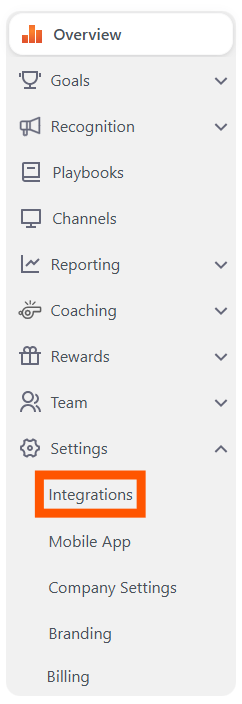
- From the left-hand menu click "**Settings**" then "**Integrations**"
### 2. Connect Nooks with Spinify
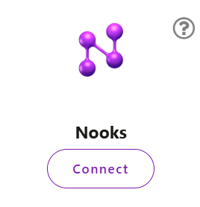
- Choose "Connect" on the Nooks Integration.
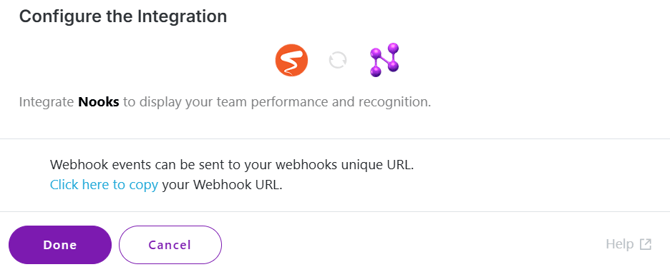
- Name your webhook connection and save.
- This will generate a Webhooks URL and display it for you. You will use this in the next section.
### 3\. Add Spinify to Webhooks
- Navigate to your application where you configure a Webhook and then add your Webhook URL.
- Connect your CRM/Data app (Eg. Nooks)
- Contact Spinify to personalize the mapping and configure the records in your Spinify account.
- [Discover Spinify](https://knowledge.spinify.com/help/discover-spinify?hsLang=en)
- [Quick Set Up](https://knowledge.spinify.com/help/quick-set-up?hsLang=en#main-content)
- [Competitions & Leaderboards](https://knowledge.spinify.com/help/quick-set-up?hsLang=en#competitions-leaderboards)
- [Users](https://knowledge.spinify.com/help/quick-set-up?hsLang=en#users)
- [Achievements](https://knowledge.spinify.com/help/quick-set-up?hsLang=en#achievements)
- [TV & Displays](https://knowledge.spinify.com/help/quick-set-up?hsLang=en#tv-displays)
- [Onboarding](https://knowledge.spinify.com/help/quick-set-up?hsLang=en#onboarding)
- [Single Sign On](https://knowledge.spinify.com/help/quick-set-up?hsLang=en#single-sign-on)
- [Integrations](https://knowledge.spinify.com/help/integrations?hsLang=en#main-content)
- [Agentbox](https://knowledge.spinify.com/help/integrations?hsLang=en#agentbox)
- [MRI Box and Dice](https://knowledge.spinify.com/help/integrations?hsLang=en#mri-box-and-dice)
- [Bullhorn](https://knowledge.spinify.com/help/integrations?hsLang=en#bullhorn)
- [Zendesk](https://knowledge.spinify.com/help/integrations?hsLang=en#zendesk)
- [PowerBI](https://knowledge.spinify.com/help/integrations?hsLang=en#powerbi)
- [CSV Upload](https://knowledge.spinify.com/help/integrations?hsLang=en#csv-upload)
- [HubSpot](https://knowledge.spinify.com/help/integrations?hsLang=en#hubspot)
- [Google Sheets](https://knowledge.spinify.com/help/integrations?hsLang=en#google-sheets)
- [Google Slides or Google Calendar](https://knowledge.spinify.com/help/integrations?hsLang=en#google-slides-or-google-calendar)
- [Spinify API](https://knowledge.spinify.com/help/integrations?hsLang=en#spinify-api)
- [Salesforce Reports](https://knowledge.spinify.com/help/integrations?hsLang=en#salesforce-reports)
- [Microsoft Excel](https://knowledge.spinify.com/help/integrations?hsLang=en#microsoft-excel)
- [Pipedrive](https://knowledge.spinify.com/help/integrations?hsLang=en#pipedrive)
- [Salesforce Trailhead](https://knowledge.spinify.com/help/integrations?hsLang=en#salesforce-trailhead)
- [Tableau](https://knowledge.spinify.com/help/integrations?hsLang=en#tableau)
- [LockedOn](https://knowledge.spinify.com/help/integrations?hsLang=en#lockedon)
- [Microsoft Teams](https://knowledge.spinify.com/help/integrations?hsLang=en#microsoft-teams)
- [SQL](https://knowledge.spinify.com/help/integrations?hsLang=en#sql)
- [Slack](https://knowledge.spinify.com/help/integrations?hsLang=en#slack)
- [Microsoft Dynamics](https://knowledge.spinify.com/help/integrations?hsLang=en#microsoft-dynamics)
- [Outreach](https://knowledge.spinify.com/help/integrations?hsLang=en#outreach)
- [Rex Software](https://knowledge.spinify.com/help/integrations?hsLang=en#rex-software)
- [JobAdder](https://knowledge.spinify.com/help/integrations?hsLang=en#jobadder)
- [Salesforce](https://knowledge.spinify.com/help/integrations?hsLang=en#salesforce)
- [Follow Up Boss](https://knowledge.spinify.com/help/integrations?hsLang=en#follow-up-boss)
- [Zapier](https://knowledge.spinify.com/help/integrations?hsLang=en#zapier)
- [CloudCall](https://knowledge.spinify.com/help/integrations?hsLang=en#cloudcall)
- [Freshdesk](https://knowledge.spinify.com/help/integrations?hsLang=en#freshdesk)
- [MRI Vault CRM](https://knowledge.spinify.com/help/integrations?hsLang=en#mri-vault-crm)
- [Webhooks](https://knowledge.spinify.com/help/integrations?hsLang=en#webhooks)
- [FTP](https://knowledge.spinify.com/help/integrations?hsLang=en#ftp)
- [GetAccept](https://knowledge.spinify.com/help/integrations?hsLang=en#getaccept)
- [Close CRM](https://knowledge.spinify.com/help/integrations?hsLang=en#close-crm)
- [HighLevel](https://knowledge.spinify.com/help/integrations?hsLang=en#highlevel)
- [Aircall](https://knowledge.spinify.com/help/integrations?hsLang=en#aircall)
- [Kixie](https://knowledge.spinify.com/help/integrations?hsLang=en#kixie)
- [LeadDesk](https://knowledge.spinify.com/help/integrations?hsLang=en#leaddesk)
- [Zoho](https://knowledge.spinify.com/help/integrations?hsLang=en#zoho)
- [Incentives](https://knowledge.spinify.com/help/incentives?hsLang=en#main-content)
- [Reward Store](https://knowledge.spinify.com/help/incentives?hsLang=en#reward-store)
- [Points, Badges & Tiers](https://knowledge.spinify.com/help/incentives?hsLang=en#points-badges-tiers)
- [Prize Wheels](https://knowledge.spinify.com/help/incentives?hsLang=en#prize-wheels)
- [FAQs](https://knowledge.spinify.com/help/faqs?hsLang=en#main-content)
- [Competitions](https://knowledge.spinify.com/help/faqs?hsLang=en#competitions)
- [Account](https://knowledge.spinify.com/help/faqs?hsLang=en#account)
- [TV & Channels](https://knowledge.spinify.com/help/faqs?hsLang=en#tv-channels)
- [Spinify](https://knowledge.spinify.com/help/faqs?hsLang=en#spinify)
- [Troubleshooting](https://knowledge.spinify.com/help/faqs?hsLang=en#troubleshooting)
- [Sidekick](https://knowledge.spinify.com/help/faqs?hsLang=en#sidekick)
- [Achievement](https://knowledge.spinify.com/help/faqs?hsLang=en#achievement)
- [Manager Toolkit](https://knowledge.spinify.com/help/manager-toolkit?hsLang=en#main-content)
- [AI Coaching Agent](https://knowledge.spinify.com/help/manager-toolkit?hsLang=en#ai-coaching-agent)
- [Analytics](https://knowledge.spinify.com/help/manager-toolkit?hsLang=en#analytics)
- [Messages & Announcements](https://knowledge.spinify.com/help/manager-toolkit?hsLang=en#messages-announcements)
- [Coaching Tools](https://knowledge.spinify.com/help/manager-toolkit?hsLang=en#coaching-tools)
- [Administration & Accounts](https://knowledge.spinify.com/help/administration-accounts?hsLang=en#main-content)
- [Billing](https://knowledge.spinify.com/help/administration-accounts?hsLang=en#billing)
- [Privacy & Terms](https://knowledge.spinify.com/help/administration-accounts?hsLang=en#privacy-terms)
- [Players Zone](https://knowledge.spinify.com/help/players-zone?hsLang=en)
- [Apps & Extensions](https://knowledge.spinify.com/help/apps-extensions?hsLang=en#main-content)
- [Chrome Extension](https://knowledge.spinify.com/help/apps-extensions?hsLang=en#chrome-extension)
- [Mobile App](https://knowledge.spinify.com/help/apps-extensions?hsLang=en#mobile-app)
- [Spinify MCP](https://knowledge.spinify.com/help/apps-extensions?hsLang=en#spinify-mcp)
[.png?width=150&height=150&name=download%20(2).png "download (2)")](https://Spinify.com)
#1 Ranked Sales Gamification Software
[mailto:email@email.com](mailto:email@email.com)
Copyright © 2024, Spinify